
A360 Help Center: How to Contact Aesthetics360 Support
- If you ever need help, have a question, or want to share feedback, there are several ways to reach the A360 support team.
- All support conversations are fully confidential and HIPAA-protected.
In this article:
- How to Access the A360 Help Center
- How to Contact Support
- How to Get Support Without Signing In
- How to Contact Support Outside the App
- For Business Inquiries
How to Access the A360 Help Center?
Both web and mobile take you to the same A360 Help Center, where you'll find three support options.
|
Option 1. After Logging into the Web App
|
|
|
|
Option 2. After Logging into the Mobile App
|


How to Contact Support?
Option 1: A360 AI Assistant
|
|
|
|


Option 2: Send a Message
|
|
|
|
|


The team will review your request as soon as possible. Their reply will be sent to your email and will also appear as a New Message in this chat.
Option 3: Live Chat
|
|
|
|


How to Get Support Without Signing In?
|
Before logging in — mobile app only
|
|
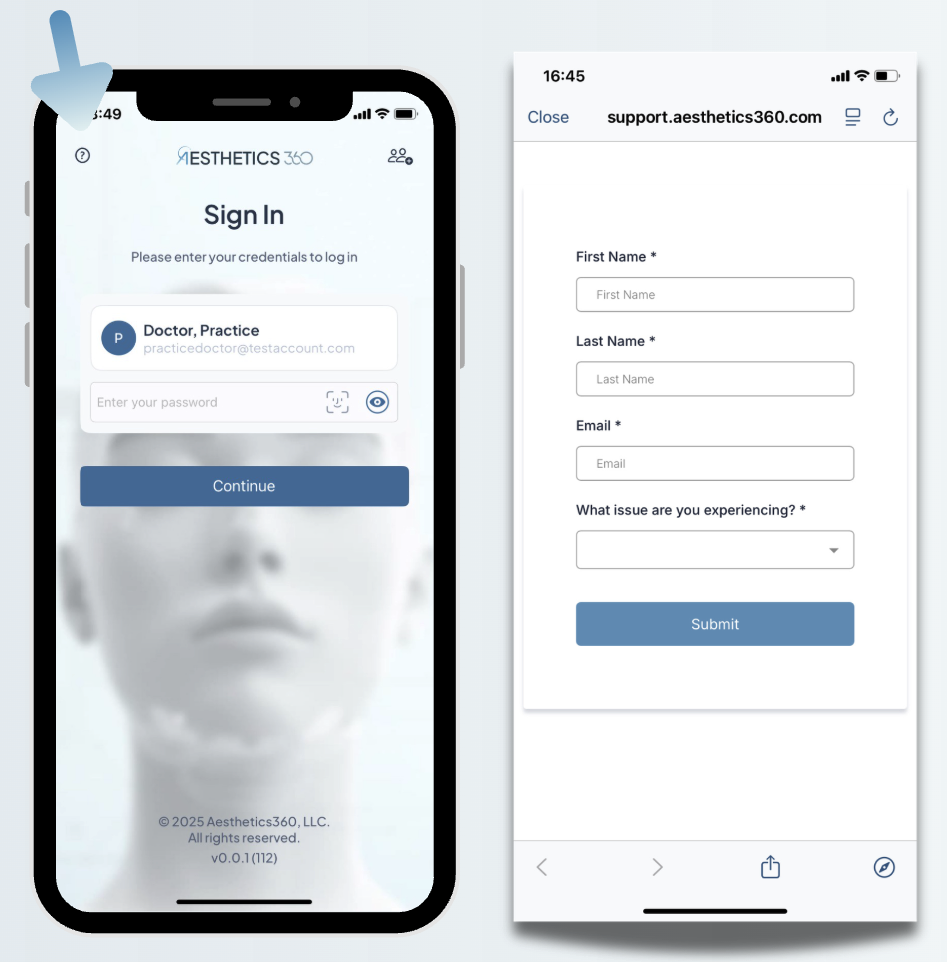
How to Contact Support Outside the App?
Yes. You can also reach the A360 support team directly:
- Support email: support@aesthetics360.com
- Help Center website: help.aesthetics360.com — you can send a message via form or start a live chat (no AI Assistant on the website)
For Business Inquiries:
- Business email: contact@aesthetics360.com
- Website: aesthetics360.com
Need Help?
If you have questions or need assistance with account security:
- Use our AI chatbot - Available in the A360 Help Center, mobile app, or web app (this feature to be available soon)
- Email support - support@aesthetics360.com
- Visit our website - aesthetics360.com
Our support team is here to help you keep your account secure